Sponso for Creators is now in Claude (and ChatGPT, and Cursor)
Or: why your AI assistant should know about your sponsorships
You're a creator. It's 11 PM. You're scrolling X with one eye, editing a thumbnail with the other, and Claude is open in a third tab because you've been using it to draft scripts. Somebody pings you about a brand deal. You switch to Sponso to check the brief. Back to Claude to write a pitch. Back to Sponso to submit. Back to Claude because Claude is genuinely better at finding the right hook than scrolling through your own old scripts at midnight.
If that's your week (and honestly, that's our week too), we built something for you.
Sponso is now available as an MCP server. That means Claude, ChatGPT, Cursor, Windsurf, and any other AI assistant that speaks the protocol can now talk to Sponso directly. Inside your chat. No tab switching. No copy-pasting. You ask, it does.
What that actually means
Open Claude. Type this:
Find me Tech sponsorships in Mumbai over ₹10k that I haven't applied to yet, ranked by approval probability.
Hit enter. Claude figures out it needs to call our list-sponsorships tool, filters the results, then asks our get-ai-recommendations tool to score how likely you are to get approved. You see a ranked list with reasons. You pick one. You say:
Draft a 90-second script for that wireless earbuds one. Open with a problem statement, that's how I usually start.
It pulls the sponsorship brief, runs our script generator, and gives you a script in your voice. You tweak two lines, send it to your editor.
That's the whole loop. Inside one chat. No copy-paste. No "let me find that brief again." No 12 tabs.
What's in the box
We shipped 30+ tools. The interesting ones, in plain English:
- Find work: search sponsorships by category, location, budget, platform; see what's nearby; get AI-ranked recommendations
- Apply: submit with custom pitches and your quoted rate; track every application across the whole workflow
- Make content: generate scripts, improve scripts, get the brand brief on tap
- Get paid: check your earnings, see what's pending, know when the next withdrawal clears
- Manage your profile: update channels, tweak categories, see your public profile
- Stay on top of it: notifications, saved sponsorships, your AI credit balance
None of these are new features. They've existed in the app for a year. What's new is: you can use all of them without opening the app.
How to plug it in
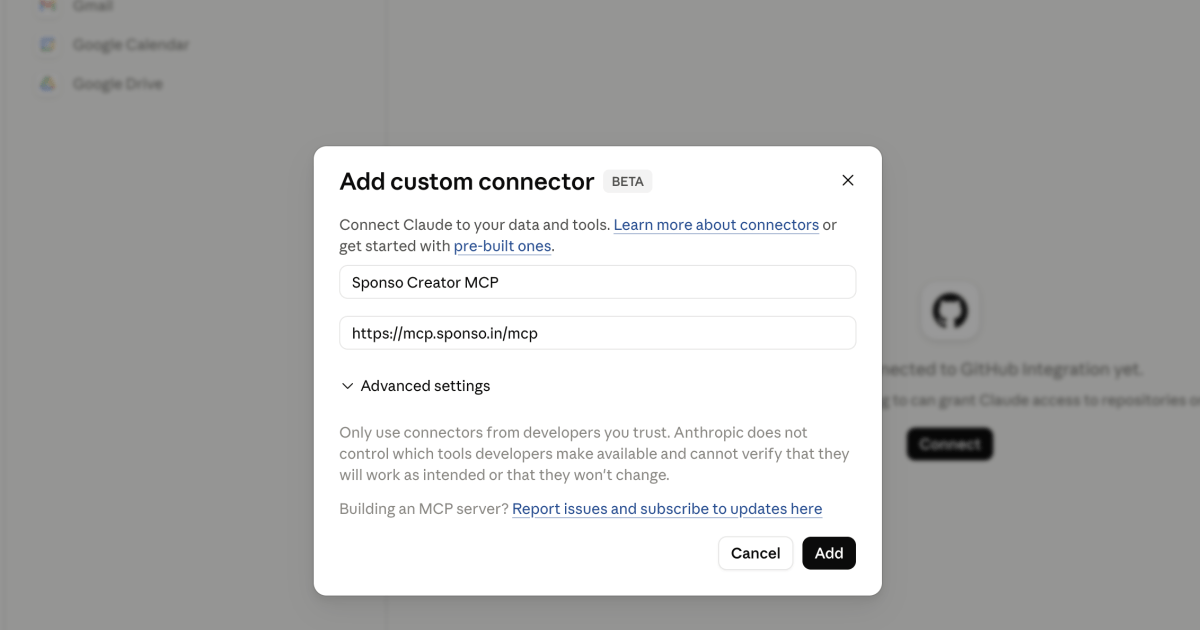
Easiest path, Claude.ai web:
- Open
claude.ai/settings/connectors - Click Add custom connector
- Paste:
https://mcp.sponso.in/mcp - Sign in with Google or your Sponso email when it asks
- Done. Go ask Claude something.
That's it. Setup time is under a minute. If you use Claude Desktop, ChatGPT (Plus/Team/Enterprise), Cursor, or Windsurf, we have config snippets for those too. Head to sponso.in/mcp.
Why this is a bigger deal than it sounds
For most of internet history, software lived in apps. You had a YouTube app, a Sponso app, an editing app, a chat app. Each had its own way of doing things. You learned them all. You context-switched between them all day. You were the integration glue.
MCP changes that for one specific reason: your AI assistant becomes the new front-end. Instead of you learning 15 apps, your AI learns 15 protocols. You stay in one place.
For platforms like Sponso, this is the first time we get to meet creators where they actually work. We've watched our top creators write scripts in Claude for months. Now we don't have to fight that. We plug into it.
The other thing nobody's saying out loud: this is going to be table stakes. Within twelve months every serious creator platform will have an MCP. The ones that don't will feel like apps from 2019. We'd rather be early than have to catch up.
What it doesn't do (yet)
Some honesty so you're not surprised:
- It can't replace looking at a real human face. If you're applying to a campaign that pays well, you should still open the app and read the brief like a normal person. AI summarizes, but it sometimes summarizes the wrong thing.
- AI credits still cost credits. Script generation costs 5 credits whether you call it from the app or from Claude. The MCP doesn't subsidize anything.
- It's brand-new. We've tested it hard, but if you hit something weird, tell us. The fastest way is to ping support from the app. It flows into the same inbox.
- There's no Brand-side MCP yet. This one is creators-only. The brand portal is for humans. We're thinking about a Brand MCP but haven't built it.
A few things we noticed during testing
Some of our early creators used Claude to do things we genuinely did not predict.
One of them asked Claude to draft thirty different pitch variations for the same sponsorship, then ran another query to score which ones matched the brand's tone best. The brand accepted them. They told us this saved roughly an hour per campaign.
Another created a custom Claude project where every conversation starts with "I'm a tech YouTuber, here are my last 5 sponsorships and how they performed." Then they ask Claude to pre-filter every new opportunity that comes in. They told us they've started declining campaigns they would have applied to before, saving themselves wasted pitches.
A third (this one made us laugh) used the script generator at 2 AM to convince themselves they shouldn't take a particular deal. They asked Claude to write the script, looked at it, and went "yeah, I don't actually believe any of this," and passed. Their words: "It was easier to see it was a bad fit when it was already written."
We didn't design for any of that. We just made it possible.
What does this cost?
The MCP is free. The Claude/ChatGPT subscription is on you. AI tool calls that use Sponso AI credits (script generation, recommendations) use the same credit balance you already have in the app. We're not double-charging. Free tier creators get the same credit allowance whether they call from app or from Claude.
Privacy: Claude only sees the results of tool calls you explicitly trigger. It can't passively read your Sponso account, can't see other creators' data, can't see your inbox, can't see your direct messages. Every tool call shows up in the chat, so you can review what got called and what came back.
Where to next
We're already prototyping a few things:
- Auto-apply rules: tell Claude to apply to any Tech sponsorship over ₹15k where you match the platform requirements. Claude does the legwork, sends you what it did
- Performance recap: ask Claude for your last month, last quarter, year-over-year in plain English
- Cross-creator collab discovery: find other Sponso creators in your category to co-create with
- Voice-style script tuning: train the script generator on your last 50 scripts so it actually sounds like you
If any of those are interesting to you, tell us. We pay attention to creators who use what we ship.
Try it
Open Claude. Hit claude.ai/settings/connectors. Paste https://mcp.sponso.in/mcp. Sign in. Ask it something. Tell us what worked, what didn't.
We're at the start of something here. The next twelve months of AI assistants getting genuinely useful for creator work is going to be wild. We'd rather you experience it on our infrastructure than someone else's.
The Sponso team
Got questions? Reply to this post, ping us on X (@sponso_in), or open Claude and ask it to help you contact support. It can do that too.
Sponso is India's largest creator network. Learn more at sponso.in or open the dedicated MCP page at sponso.in/mcp.